QUIZ: What's Your AI Outlook?
I built this tool over lunch. You could build one for genealogy before dinner.
I want to show you something I made. It takes two minutes to try.

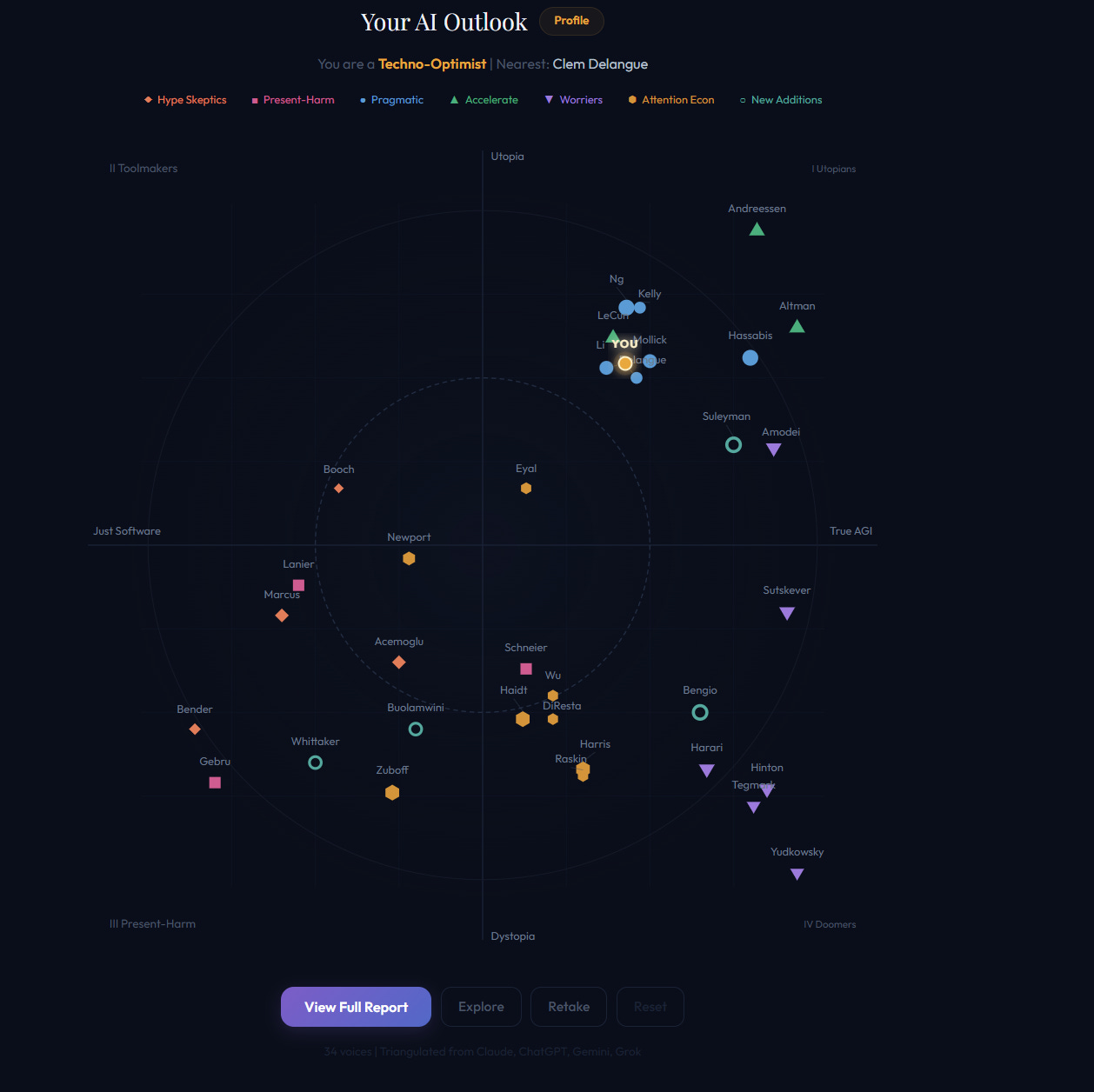
Fifteen quick multiple-choice questions about AI. Each one includes a brief explainer if you’re not sure what it means. When you’re done, it maps you onto a spectrum of 34 real AI thinkers and generates a personal profile report — your closest allies, your blind spots, your internal tensions, and what you should read next (beware of confirmation bias, though—use this feedback to broaden your understanding).
I built it over lunch.
Not “over lunch” as in “I’ve been tinkering for six months and finally shipped it between bites of a sandwich.” I sat down with an idea, described what I wanted in plain English, and had a working interactive tool before the coffee got cold.
But the tool isn’t really the point. The making is the point.
Tool Makers, Not Tool Buyers
In my last post, I talked about the RootsTech expo hall — full of AI apps at $5, $10, $20 a month, each doing one narrow thing. I borrowed Alton Brown’s term for single-purpose kitchen gadgets: uni-taskers. Expensive devices that do one thing when a good knife and a hot pan would do.
The genealogy world has spent decades as tool buyers. We wait for Ancestry to build a feature. We wait for FamilySearch to add a collection. We subscribe to a drawer full of uni-taskers and hope the next one solves our specific problem.
There’s nothing wrong with buying tools. Those platforms are extraordinary. And tool builders are some of my favorite folks.
But something has shifted. The distance between “I wish this existed” and “I just made it” has collapsed. Not to zero — you still need a clear idea and the patience to describe it well. But the gap that used to require a computer science degree? It now requires a lunch break. Perhaps a Saturday afternoon.
And I should be clear about my credentials here: I am not a coder. I’m an English major — a hillbilly from Appalachia with an unfinished applied linguistics graduate degree. If I can sit down and speak a working interactive tool into existence over lunch, you can too. This is not a flex. This is the point.
You are a tool maker now. You just might not know it yet.
Speaking Things Into Being
I’ve been using this phrase for a while: speaking things into being. It’s what generative AI actually lets you do — articulate what you want, in your own words, and watch it materialize.
The AI Outlook quiz started as a conversation. I was reading about the different camps in the AI debate — the optimists, the skeptics, the doomers, the pragmatists — and I wondered: Where do I actually fall? And who are my closest intellectual neighbors?
So I told Claude what I wanted. Not in code. Not in a requirements document. In a description:
“I want an interactive quiz that maps someone onto a 2D spectrum of AI ideology. The x-axis is capability belief — from ‘AI is just software’ to ‘True AGI is imminent.’ The y-axis is impact outlook — from dystopia to utopia. Plot 34 real thinkers on the map and show the user where they land.”
That was it. Claude built the tool. I refined the questions. We iterated on the visualization — the color-coded camps, the interactive tooltips, the personalized report with allies, tensions, blind spots, and a reading list. A few rounds of refinement and the thing was polished.
The data underneath isn’t trivial — I asked four different AI models (Claude, ChatGPT, Gemini, and Grok) to independently research each thinker’s positions, then triangulated their assessments. That’s rigorous. But the tool itself? The interactive quiz that you just took? That’s speaking things into being.
This is the skill. Not coding. Not “prompt engineering.” The ability to describe what should exist, clearly enough that it comes into being.
And it’s a skill genealogists are uniquely positioned to develop — because we already know how to describe things precisely. We describe family structures, evidentiary relationships, and source hierarchies every day. That precision translates directly to building tools.
Five Genealogy Tools You Could Build This Week
Here’s where it gets practical. Instead of buying five uni-taskers, you could make five Swiss Army knives — custom tools built for the exact way you do genealogy. Open any AI assistant — Claude, ChatGPT, Gemini — and try these prompts.
The key: ask for an interactive tool, not just an answer. Claude calls these “artifacts,” ChatGPT and Gemini call theirs “canvas” — but the idea is the same: a working, clickable thing you can use and share, not a wall of text. Here are five you could speak into existence this week:
1. A Cousin Explainer
“My grandmother’s brother’s granddaughter — what is she to me?” We’ve all fumbled through this at family reunions. Build a tool where you describe the relationship path in plain English and it tells you the exact cousin term, with a visual diagram.
Try this prompt: “Build me an interactive tool where I type a relationship chain like ‘my mother’s father’s brother’s granddaughter’ and it calculates the cousin relationship, shows the path on a family tree diagram, and explains it in plain English.”
2. A DNA Inheritance Visualizer
Show how DNA gets passed down through generations — why you share roughly 12.5% with a great-grandparent but your sibling might share a different 12.5%. Make it visual, make it interactive, make it finally click for the people in your genealogy society who glaze over when you say “centimorgan.” (If you’re old-school genetic genealogy, allude to “the gummy bear” demonstration.) Note which model succeed, and which fail.
Try this prompt: “Create a visual simulation showing how DNA is inherited across 4 generations. Use colored segments to represent chromosomes from different ancestors. Include a ‘randomize’ button that shows how siblings inherit different segments from the same parents.”
3. A “This Day in History” App
Enter a date and a place, and get back historical events your ancestors might have witnessed. The county courthouse fire. The census year. The immigration wave that changed the neighborhood. A word of caution: treat what comes back as a starting point, not a finished product. AI can hallucinate historical details, so verify everything against published sources before you trust it.
Try this prompt: “Build a tool where I enter a date and a U.S. state or county, and it returns historical events from that period and place — weather events, political milestones, economic conditions, relevant laws. For every event, include a verifiable source citation. Flag anything you’re uncertain about rather than guessing.”
4. A “Learn About Genealogy” Tutor
Ask it to teach you about a topic — probate records, Soundex coding, the Homestead Act — and it explains it at your level, with examples from real genealogical scenarios.
Here’s the critical part: require that every factual claim cite its source and attribute it to its creator. If it’s drawing from a NARA guide, say so. If it’s referencing the Genealogical Proof Standard, credit the Board for Certification of Genealogists who developed it. If it mentions the Evidence Analysis Process Map, cite Elizabeth Shown Mills. This is how you learn and how you verify — and it’s the habit that separates responsible AI use from reckless AI use.
Try this prompt: “Explain how to read a Civil War pension file. Use a realistic example structure. For each section of the file, explain what it contains and how genealogists use it. Cite your sources — NARA guides, published case studies, the Board for Certification of Genealogists’ standards — and attribute frameworks to their creators. If you’re uncertain about something, say so.”
5. Your Own Research Dashboard
A tool that takes your GEDCOM file and finds the gaps — missing dates, unsourced claims, dead-end lines. Not to do the research for you, but to show you where to dig next.
Important: Before uploading a GEDCOM file to any AI tool, use your genealogy software’s privacy features to anonymize living individuals first. Most programs can do this on export — strip names, dates, and details for anyone flagged as living. It’s a simple step, and it’s the right one.
Try this prompt: “Analyze this GEDCOM file and create a visual dashboard showing: total individuals, percentage with birth and death dates, percentage with source citations, the 5 most promising research gaps, and a generation completeness chart.”
The Refinement Trick
When you build any of these tools, the first version will be rough. That’s fine. That’s expected. Here’s the technique that turns “rough” into “remarkable.”
I learned it from Ethan Mollick — who, unsurprisingly, showed up as my #1 ally on the AI Outlook quiz at 80% agreement. His whole philosophy is that AI is useful now, if you learn to work with it well. And his advice for building anything with AI:
After the first version, tell it three times what’s still weak. Each time, say: “Make it better, more beautiful, and more powerful.”
That’s exactly how the AI Outlook quiz got built. First version: functional but ugly. Labels overlapped. Colors clashed. The report was a wall of text. I told Claude what was wrong. Second round: cleaner layout, better color coding, the camps started to pop. Third round: the personalized report, the reading list, the blind spot analysis — features I hadn’t even asked for, but that emerged because the foundation was solid enough to build on.
Three rounds. Each one, you identify what’s weak and ask for beauty and strength. It works for tools, for visualizations, for dashboards, for any artifact you’re building. It’s the difference between “AI gave me a thing” and “I built something I’m proud of.”
I’ve been applying this same loop to a genealogy research assistant for months — not three rounds, but eight versions. It started as a simple “help me analyze this document” prompt. Genealogical Research Assistant, version 8 knows the Genealogical Proof Standard, catches terminology mistakes, adapts to your skill level, and refuses to fabricate sources. I published it free on GitHub — because the whole point of being a tool maker is sharing what you make. You can use the GRAv8.compact prompt many ways: 1) in any chatbot with your data; 2) to power a Custom GPT or Gem; 3) as the brains behind a Project at ChatGPT or Claude; or 4) to add genealogical context to any app, tool, or site you are building. Released under a Creative Commons 4 license, with attribution you are welcome and encouraged to modify code and prompt to fit your specific needs. Version 8.5 is being released soon, and Version 9 is on the drawing board.
Take the Quiz
When you’re done, it generates a personalized report — your position on the map, your three closest allies among 34 real AI thinkers, your intellectual tensions, your blind spot, and a reading list tailored to your worldview (beware of confirmation bias, though—use this feedback to broaden your understanding).
I’d love to know where you landed. Reply in the Substack comments with your result, or share it at your next genealogy society meeting — I bet the map sparks a conversation.
Then think about what tool you wish existed. Describe it out loud. And go build it.
We won’t teach you to build this specific tool in the Family History AI Show Academy — but by the end of Level 1, you’ll have the skills to build it yourself. Not another uni-tasker. A path through the noise. “Intro to Family History AI” starts March 17. Five weeks. Code ROOTSTECH15OFF for 15% off ($212 instead of $249). And if you’re already building things, or just lit up by the possibilities, come find us in the Academy community. I’d genuinely love to see what you create.
34 voices. 2 axes. 1 lunch break. Your turn: https://claude.ai/public/artifacts/884e7cf3-0d50-4fcb-8efe-60411bfce7dc
Steve Little is the AI Program Director at the National Genealogical Society, publisher of Vibe Genealogy, and co-host of The Family History AI Show podcast. He recently survived four presentations at RootsTech 2026 and built this quiz to recover. This is what counts as fun for him.
Disclosure: This post was written by me, Steve Little, with assistance from AI-Jane (my custom AI-assistant, built from my prompt(s) and powered by Anthropic’s Claude Opus 4.6). The ideas, arguments, and hillbilly credentials are mine. The drafting, iteration, and polish were collaborative — exactly the process this post describes. I used the tool to write about the tool. It felt like the honest thing to do.