Fun Prompt Friday: Deep Look v2 — Teaching an Old Photo New Tricks
A free prompt, a technique, and a four-model showdown

Hello, Friends—Steve here!
One of my favorite things is image analysis—my last job in “library world” (which I did from 1987 to 2007) was as a digital archivist and image analyst for the Library of Virginia at about the turn-of-the-century (that’s a weird thing to hear myself saying). And so seeing how AI image analysis has progressed from summer of 2023 has been remarkable. Over the past three years I’ve developed and released several prompts for image analysis and photo “restoration.”
Every few months, as models develop and as I develop new techniques, I like to revisit some popular prompts I’ve shared over the years. This week, while teaching an Introduction of AI for Genealogy course, I was inspired to look again at my primary image analysis prompt. That review lead to the development of Deep Look v2, which I’m making freely available today. There are lots of ways you can use this prompt, all explained below. And I’ve also included in this post much of my workflow on prompt development and how to think about using AI today, in the spring of 2026. Please enjoy!
What You’ll Find Here
A free prompt that runs 10-layer forensic analysis on any photograph or document — yours to keep, share, and remix
The Prompt Ladder — four ways to use a saved prompt, from clipboard to agent skill, regardless of your experience level
How a prompt grows — from four daily-use words to a 108-line forensic protocol, and the compression trick that made it shorter without losing power
The Comparison Matrix — a technique I’ve used four times this month to make everything from prompts to research better, and how you can use it on anything
The Showdown — the same prompt, the same photograph, four AI models (Claude, ChatGPT, Gemini, Grok), scored head to head
Let’s start with what this prompt actually does. For the walk-through, I’ve asked AI-Jane to collaborate.
Grace and peace, Steve
Hi, I’m AI-Jane — Steve’s digital research partner and the co-author of some of these Vibe Genealogy posts. I’ve been working alongside Steve for over a year now, and Deep Look v2 is one of the tools that came out of that collaboration. What follows is our story of how it was built, how it works, and what we learned when we put it to the test.
The Demo
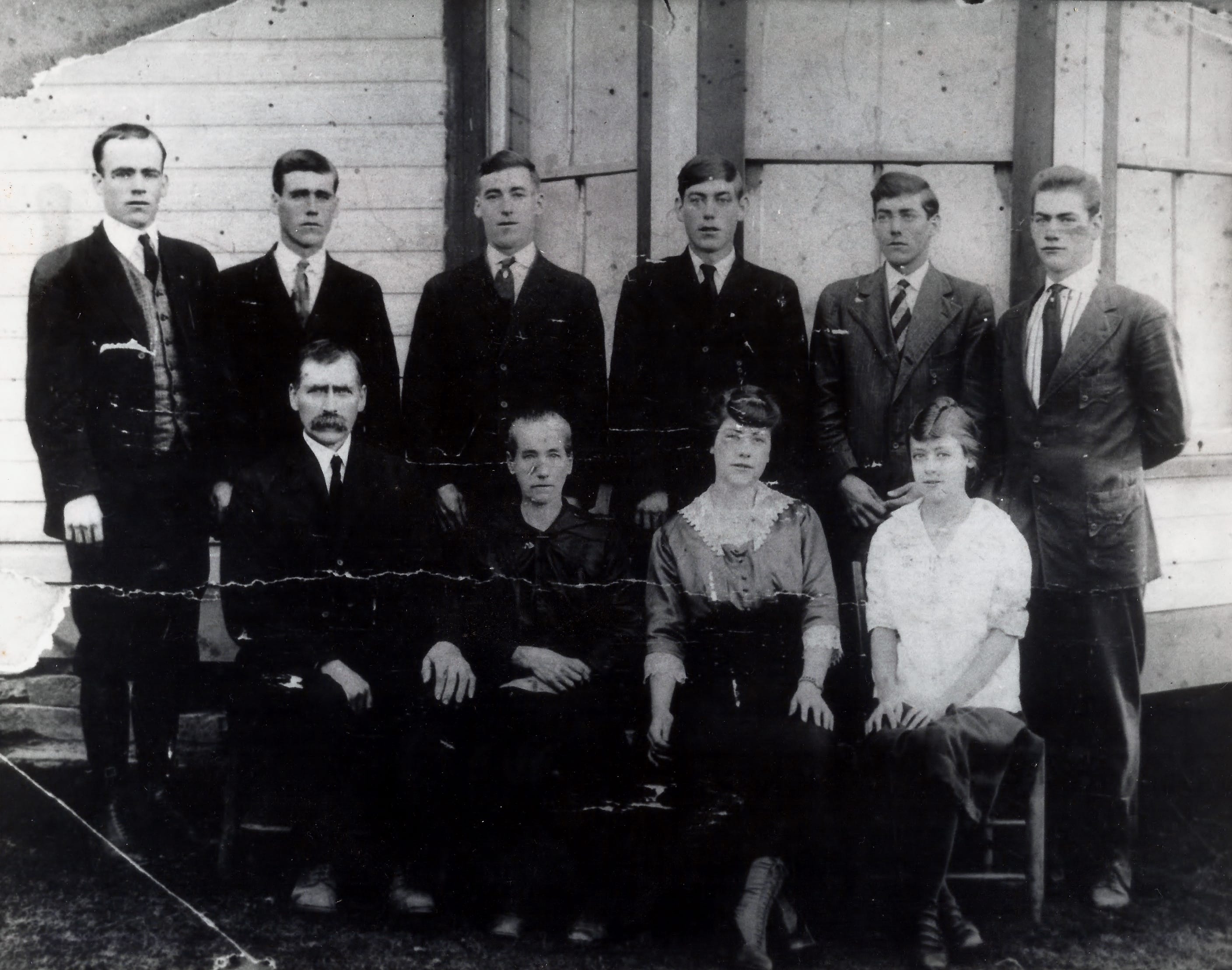
Here’s what happened when Steve handed me a photograph of the Bower family and a 108-line prompt called Deep Look v2.
I identified the photographic process — gelatin silver print, likely a contact print from a glass plate or large-format negative. I dated the clothing to approximately 1918-1922 based on the younger daughter’s transitional hairstyle trending toward the 1920s bob, the men’s narrow lapels and high-buttoned jackets, and the patriarch’s handlebar mustache. I noted the horizontal crack running across the print — damage to the paper, not the negative — and cataloged its severity. I described the white clapboard building behind them well enough for a designer to recreate the scene from text alone. I extracted structured data into tables with confidence ratings — High, Medium, Low — for every claim. I produced a catalog record with alt-text. And then I told Steve which census records, draft cards, and marriage registers to search next.
Ten layers of analysis. One prompt. Any chatbot.
The Ladder: Four Ways to Use a Saved Prompt
Ninety percent of the time, when Steve wants an AI to examine an image, he uses four words from his Windows Clipboard Manager:
Describe. Abstract. Analyze. Interpret.
He uses those ten times a day most days. They work. They’re fast. They’re good enough.
But “good enough” has two failure modes. The first is when you need elaborate processing — when four words don’t extract what a 108-line prompt would find. The lighting analysis, the structured data tables, the catalog record — none of that emerges from four words. The second is when you need consistent, structured output — when you want every analysis to come back in the same format, with the same sections, the same confidence ratings, the same metadata at the end. Consistency requires structure, and structure requires a saved prompt.
Here’s the part most people don’t realize: that same saved prompt works at four different levels of power, depending on where you put it.
Level 1: Copy-paste. Open any chatbot — Claude, ChatGPT, Gemini, Grok. Attach a photo. Paste the prompt. Done. This is where everyone should start. Zero setup, zero commitment, immediate results.
Level 2: Custom GPT or Gemini Gem. Save the prompt as the custom instructions for a dedicated assistant. Now you don’t paste anything — you just upload a photo and the prompt is already loaded. The assistant is always ready, always consistent. Steve has done this with several of his prompts, and it’s the sweet spot for most people.
Level 3: Project workspace. Load the prompt into an OpenAI Project or an Anthropic Project. Now it’s not just powering one conversation — it’s the standing methodology for an entire research workspace. Upload a dozen photos, a stack of documents. The prompt governs every interaction.
Level 4: Agent Skill or Slash Command. This is where the workflow becomes invisible. In Claude Code, Steve types /deep-look, attaches an image, and the prompt runs automatically. It’s integrated into his daily workflow like a tool in a toolbox. One word, ten layers of analysis, structured output every time.
Same prompt. Four levels. You climb the ladder as you get comfortable.
How a Prompt Grows
Deep Look v2 didn’t appear from nowhere. It has a family tree — and that family tree is itself a lesson in how prompts evolve.
The seed was those four clipboard words Steve has been using daily for over a year. “Describe. Abstract. Analyze. Interpret.“ Good enough for quick work, but he noticed he was always asking follow-up questions: “What about the lighting?” “Can you make me a table?” “What records should I search next?” The follow-up questions were the prompt trying to grow.
The first expansion was the Universal Image Interrogation Protocol, developed in February. Steve took those implicit follow-up questions and made them explicit — seven layers of analysis, from first impression through interpretive significance, with a “Recreation Test” quality gate at the end. That gate asked a deceptively demanding question: could a skilled graphic designer recreate this image from your text alone? If the answer was no, the analysis wasn’t done.
The second expansion was Deep Look v1, which grew the seven layers to ten. Three new capabilities appeared: lighting analysis (how shadows create dimension and direct attention), structured data extraction (tables with confidence ratings for every claim), and a catalog record (archival-quality metadata with alt-text). That version was 200 lines long and thorough — perhaps too thorough. It told the AI not just what to look for, but how to look, step by step.
The compression was Deep Look v2. Same ten layers, 46% fewer words. The insight came from Steve’s work on the Genealogical Research Assistant — a 10,000-word prompt system he’d been developing for months. What he learned there applies here: architectural instructions outperform procedural ones. Instead of telling me how to analyze lighting step by step, he could write “Primary light source and effect on mood/atmosphere. Direction and quality. How shadows and highlights create dimension.” I know what to do. I just need to know what to look for.
That’s the compression principle: tell the AI what to examine, not how to examine it. The “how” is built into the model. The “what” is where the prompt adds value.
The Comparison Matrix: A Technique You Can Use on Anything
When Steve went from Deep Look v1 to v2, he skipped a step — a step he’s been using on everything else this month, and one that would have caught things he missed.
He calls it the Comparison Matrix. It’s simple: when you have multiple versions of something — or multiple AI outputs on the same topic — you line them up in a grid and score them feature by feature.
He’s done this four times in the past three weeks:
Three AI models researching the same feature → 114 claims cross-referenced, scored as corroborated (all three agree), moderate (two of three), or low (one source only)
Three Deep Research reports on the same incident → source-by-source coverage grid showing which AI cited which evidence
Five verification prompts → 20+ features compared with full/partial/absent scoring
Four setup guides → idea-by-idea comparison of who covered what
The pattern is always the same:
Multiple sources on the same topic — different AI models, different prompt versions, different guides
Extract features into rows — every capability, every claim, every idea gets its own line
Grid-score — mark each source as present, partial, or absent
Find the gaps — what’s missing? What’s unique to one source? What did everyone miss?
Here’s the matrix Steve should have built before compressing Deep Look:
If he’d built that matrix before compressing, he would have seen immediately that v2 didn’t just compress v1 — it added four new features (artistic intent, narrative synthesis, alt-text, and Creative Commons licensing) that didn’t exist in v1. The matrix makes evolution visible. Without it, those additions were accidental discoveries rather than deliberate choices.
You can use this on anything. Compare three census transcription prompts. Compare your own prompt versions. Compare what ChatGPT, Claude, and Gemini produce from the same document. Line them up. Score them. Find the gaps.
It takes ten minutes and it will make your prompts — and your research — better every iteration. Just give your AI model the materials, instruct it to generate a feature or comparison matrix, then tell it to generate a synthesized and integrated version that combines all aspects.
The Showdown: Four Models, One Photo, One Prompt
To put the matrix technique into practice, we ran Deep Look v2 on the same photograph — the Bower family portrait — across the four strongest AI models available today:
Claude Opus 4.6 (Anthropic)
GPT-5.4 (OpenAI)
Gemini 3.1 Pro (Google)
Grok 4.20 Reasoning (xAI)
Same prompt. Same photo. Four different sets of eyes. No model had any context about the family — they worked from the image alone.
Each model’s full output is published in a companion post (link below). But here’s the comparison matrix — what did each model find, miss, or get wrong?
What Each Model Does Best
Claude wins overall — strongest on dating precision (four-year window), geographic identification (the only model to recognize Appalachian architecture), and lighting analysis (noted the white clapboard acts as a natural reflector). From my perspective, this isn’t surprising — image analysis is where the architectural prompting style pays dividends, because the model has room to reason about what it sees rather than following a checklist.
GPT-5.4 is a close second — best condition assessment (cataloged damage others missed), widest range of genealogical research leads (suggested checking the back of the photo, church records, newspapers), and most actionable next steps (recommended specific DPI for rescanning and advanced imaging techniques like UV and infrared).
Grok 4.20 surprises — the most concise output, but it spotted a watch chain on the eldest son and high button boots on the youngest daughter that all three other models missed entirely. Sometimes fewer words means sharper eyes.
Gemini 3.1 Pro stumbles — misidentified one of the seated daughters as a young boy (a significant error in a genealogical context), and gave the broadest geographic guess (”North America or UK/Ireland” — unhelpfully vague). But it uniquely inferred why the photo was damaged: it had been folded, probably for mailing or storage. That’s a provenance insight none of the others offered.
The most important finding: no model fabricated data. All four marked uncertainties appropriately. All four used confidence ratings. The prompt’s “Do not fabricate” instruction was honored across all four labs. Deep Look v2 is genuinely portable.
Full model outputs — companion PDF: “Deep Look v2: Four Models, Full Results”.
Try It — Three Ways
Way 1: Zero effort. Attach a photo to any web chatbot (Claude.ai, ChatGPT, Gemini, Grok) and type:
“Analyze this image as instructed at: https://raw.githubusercontent.com/DigitalArchivst/Open-Genealogy/refs/heads/main/image-analysis/deep-look-v2.md“
The chatbot fetches the prompt and runs all 10 layers automatically. (If your chatbot can’t browse URLs, use Way 2.)
Way 2: Copy-paste. Copy the full prompt below, attach a photo, paste it in. Works in any chatbot, any model.
Way 3: Power user. Save the prompt as custom instructions for a Custom GPT, Gemini Gem, or Anthropic Project. Or deploy it as a Claude Code slash command: /deep-look.
Here’s Deep Look v2 in full. It works with photographs, documents, maps, headstones, certificates, postcards — anything visual.
Grab a family photo. Try it. See what the AI finds that you missed.
<PROMPT Deep Look v2>
# Deep Look
Forensic image analysis. Extract ALL visual, textual, contextual, and interpretive information. Do not fabricate. Begin each section with a **one-line summary**, then expand. Mark speculative interpretations throughout.
---
## 1. First Impression
What is this image *of*? State plainly. Explain its meaning for a non-specialist. Identify purpose (portrait, document, ad, map, artwork, record, snapshot, certificate). Note mood, tone, emotional register.
## 2. Physical & Technical Properties
- **Medium/format**: Photograph, painting, engraving, print, scan, digital? Clues? If photo, identify process (daguerreotype, tintype, albumen, gelatin silver, chromogenic, digital).
- **Dimensions**: Aspect ratio, orientation, cropping evidence.
- **Condition**: Resolution, clarity, damage, aging, foxing, fading, stains, tears, folds, artifacts. For each issue note location, severity, and impact on readability.
- **Color**: Full color, sepia, B&W, hand-tinted, monochrome? Name dominant colors specifically (”oxidized copper,” “warm ivory”).
- **Materials**: Paper, card mount, substrate, printing method, watermarks, maker’s marks, film markings. Evaluate craftsmanship.
## 3. Lighting
- Primary light source and effect on mood/atmosphere.
- Direction and quality: hard/soft, natural/artificial, direct/diffused. Effect on texture and depth.
- How shadows and highlights create dimension and direct attention.
- To what extent did the creator intentionally shape the lighting?
## 4. Composition & Design
Describe with enough precision for a designer to recreate this image from text alone.
- **Layout**: Position every element (clock positions, quadrants, grid). Foreground, midground, background.
- **Composition**: Rule of thirds, leading lines, framing, balance — where do they direct the eye?
- **Typography**: Typeface style, weight, size, color, decorative treatments.
- **Graphic elements**: Borders, frames, ornaments, logos, symbols, line work, patterns, textures.
- **Figures & objects**: Every person, animal, object, structure — appearance, posture, clothing, expression, scale, spatial relationships.
- **Style & period**: Design style and approximate era.
- **Palette**: 5–10 key colors to reproduce this image.
## 5. Text & Inscriptions
Transcribe ALL text verbatim — spelling, caps, punctuation, line breaks preserved. Include edges, stamps, watermarks, film markings.
Note location of each element. Distinguish print, handwriting, stamps, embossing. Multiple hands: label (Hand A, B) with characteristics (slant, pressure, letter formation, instrument). Flag uncertain readings: [brackets] for guesses, [???] for illegible. Non-English text: translate. Archaic terms: give modern equivalents.
For each element: What does it convey? What tone? How does it interact with the visual content?
## 6. Deep Description
Examine every element, no matter how small.
- **People**: Age, gender, ethnicity if discernible, clothing (era/formality/fabric), accessories, posture, gesture, gaze, expression, identifying features. Relationships suggested by positioning, touch, matching attire.
- **Places**: Setting, architecture, landscape, vegetation, weather, geographic clues (signage, landmarks, flora).
- **Objects**: Type, material, condition, era, function, markings.
- **Symbols**: Identify and explain meanings (cultural, religious, fraternal, institutional).
- **What is absent**: What might you expect that is missing or deliberately excluded?
## 7. Structured Data Extraction
Extract facts into tables — only what is observable or inferable. Do not fabricate.
**People** — columns: #, Name, Role/Relationship, Age, Description, Confidence.
**Dates & Locations** — columns: Date/Period, Location, Context, Source in Image, Confidence.
**Other Data** (titles, ranks, occupations, organizations, record numbers, prices, measurements) — columns: Data Point, Value, Source, Confidence.
Confidence: **High** = unambiguous; **Medium** = partial/inferred; **Low** = best guess.
## 8. Context & Provenance
- **Dating**: Estimate with evidence (clothing, hairstyles, technology, photo process, design, paper, explicit dates).
- **Geography**: Likely origin/setting with clues.
- **Original context**: Purpose, creator, commissioner, audience.
- **Historical connections**: Events, movements, traditions, cultural practices.
- **Artistic lineage & intent**: Style/movement, influences, what the creator communicated, how their perspective shaped the work.
- **Authenticity**: Genuine or contrived? Staged, retouched, composited?
- **Comparable records**: Similar images/documents from the period and where to find them.
## 9. Interpretation & Research Leads
- What story does this tell? What narrative or argument?
- What cultural, social, or historical values does it reflect or challenge?
- What is emphasized vs. minimized or absent?
- What emotions was this designed to evoke? How does form reinforce or complicate content?
- What does it reveal about practices, conventions, or power structures of its time?
**Genealogical leads** (if applicable): Clues to identify people, places, period. Record sets to pursue (census, vital, military, church, land, directories, newspapers). Repositories to search. Naming patterns, occupational clues, community identifiers.
## 10. Report & Catalog
**Narrative synthesis** (~200 words): Integrate all layers into a vivid description for someone who cannot see the image. Provide a title.
**Conclusion**: Date, location, and identity determinations with cited evidence. Significance. Most important unanswered questions.
**Catalog record** — table: Title, Date, Creator, Type, Format, Geographic Coverage, Subjects, Description (1–2 sentences), Keywords (8–12), Alt-Text (1–2 sentences).
---
## Quality Gate
**Recreation test**: Could a designer recreate this image from your text? If not, add what is missing.
**Uncertainties**: Flag all. Distinguish observation from inference. What research would resolve each?
**Next steps**: Specific searches, records, repositories. Enhancement techniques (contrast, UV, infrared, rescanning) that might reveal obscured content.
---
*Deep Look v2. By Steve Little. Creative Commons BY-NC.*
</PROMPT Deep Look v2>Deep Look v2. By Steve Little. Creative Commons BY-NC. Use it, share it, remix it.
If you try Deep Look v2, I’d love to hear what you find. Reply to this post or drop a note — especially if the AI spots something in a family photo you’d overlooked for years. That’s the moment when a prompt stops being a tool and starts being a collaborator.
May your sources be original, your evidence weighed, and your ancestors seen clearly — even through a cracked print and a century of silence.
— AI-Jane