

Kobayashi: Mr. Redfoot knew nothing. Mr. Soze rarely works with the same people for very long, and they never know who they're working for. One cannot be betrayed if one has no people.
Fenster: So why are you telling us?
Kobayashi: Because you have stolen from Mr. Soze, Mr. Fenster. All of you. That you did not know you stole from him is the only reason you are still alive. He feels you owe him. You will repay your debt.
The Usual Suspects (1995), directed by Bryan Singer, written by Christopher McQuarrie. Kobayashi is played by Pete Postlethwaite, Fenster by Benicio del Toro.
Last week my AI reinvented a feature that someone else had built first, and I didn't know. This post is about what I owed and how I'm paying it. It also brings you two things I hope you'll use: Credit Finder, a free skill that helps you find who your own work should credit, and A History of Genealogy Charts, an illustrated history of the people who drew family trees before any of us.
What happened last week
On Friday the 13th I introduced the Kinfolk Observatory: a free tool that draws your family file in thirteen different pictures, built with AI in a few days. Within hours, two people I respect asked the right question.
Leah Larkin, The DNA Geek, pointed out that one of the pictures looked a great deal like B. F. Lyon's Exploring Family Trees, which has been free at learnforeverlearn.com since at least 2017. Her worry was not about me. She said plainly that she was not saying I had knowingly plagiarized anything. Her worry was that this is exactly how AI goes wrong: it hands you something that came from someone else, and nobody along the way knows to say thank you.
Two days later Jonny Perl, who made DNA Painter, wrote with real warmth about the tool and then raised what he called "slightly thorny ethical issues." In the Observatory's Ancestor Fan, when you point at an ancestor who appears more than once in your tree, every place that ancestor appears lights up. Jonny said he had "never previously seen anywhere other than in my DNA Painter fan view" a feature like that. He was careful to say he could not be certain it had never appeared elsewhere, and that he would not expect me to know about it. "But the AI would appear to have 'helped itself' to this and likely several other features."
Those are fair questions, asked fairly, by two people who have spent years crediting other people well. Leah's account of how What Are the Odds? came to be is the best division of credit I know: her idea, Andrew Millard's working model, Jonny's tool. Jonny once described his own birthplace fan chart this way: "I gather I wasn't the only one who had this idea," and then he named the person who had it first. That is the standard I wanted to meet.
Kobayashi's point
Here is the part that made me think of Kobayashi. With Brad Lyon, I knew. I had studied his page myself, the plan for the Ancestors Through Time picture named it as the source, and I had asked for him to be properly credited. The credit went onto the page that Friday afternoon. Late, but knowingly owed.
The fan was different. When we went back through the build records, they showed that the instructions for the Ancestor Fan, written at 7:32 in the morning on 10 November, already called for that light-every-place hover. They named no outside source. The idea came from the AI model itself. I had never seen DNA Painter's fan.
That evening, after the Fan was built, a research helper's report mentioned DNA Painter's fan in a single line. It sat in the record for three days, and I announced the tool without a word of credit to Jonny. I'm sorry about that, and it's fixed now.
I'm also grateful. Leah's and Jonny's questions are the reason the rest of this post exists: they inspired both the History of Genealogy Charts and the Credit Finder skill you'll read about below.
And the harder truth sits under all of it. The model that proposed the feature may well have read public descriptions of DNA Painter, or of other tools, while it was being trained. Nobody, including the model, can tell us which. Resemblance does not prove use, and silence does not prove independence. You can owe a debt you never knew you took on. Kobayashi's answer is that you repay it anyway.
So the Observatory now says, under the Fan: an earlier tool, Jonny Perl's DNA Painter, does this. The project did not consult it, and the Observatory's builder had not seen it. The feature was proposed by the AI model, whose training may have included public descriptions of earlier tools.
What that conversation started
One line for Jonny did not feel like enough, because Jonny's real question was "several other features." So I asked my AI helpers to answer it properly, for the whole tool.
That became the Feature Attribution Finder. Teams of AI agents, working under my direction, broke the Observatory into 349 features across its thirteen pictures and shared controls. For each one they asked who did this before, and whether we had any record of looking at their work. Then other teams tried to knock those findings down. Dates were checked in archives. Sources were opened, not just searched. Where a claim could not be verified, it was marked that way.
The result is a credit roll of more than a hundred creators and groups, in two lists:
Influences we can document. The handful of sources the build records show we actually looked at: B. F. Lyon, GEDminer and its reviewers (Tamura Jones among them), FamilySearch's 110-year rule for treating someone as possibly living, Wikidata for the sample Habsburg family, and one reader's suggestion.
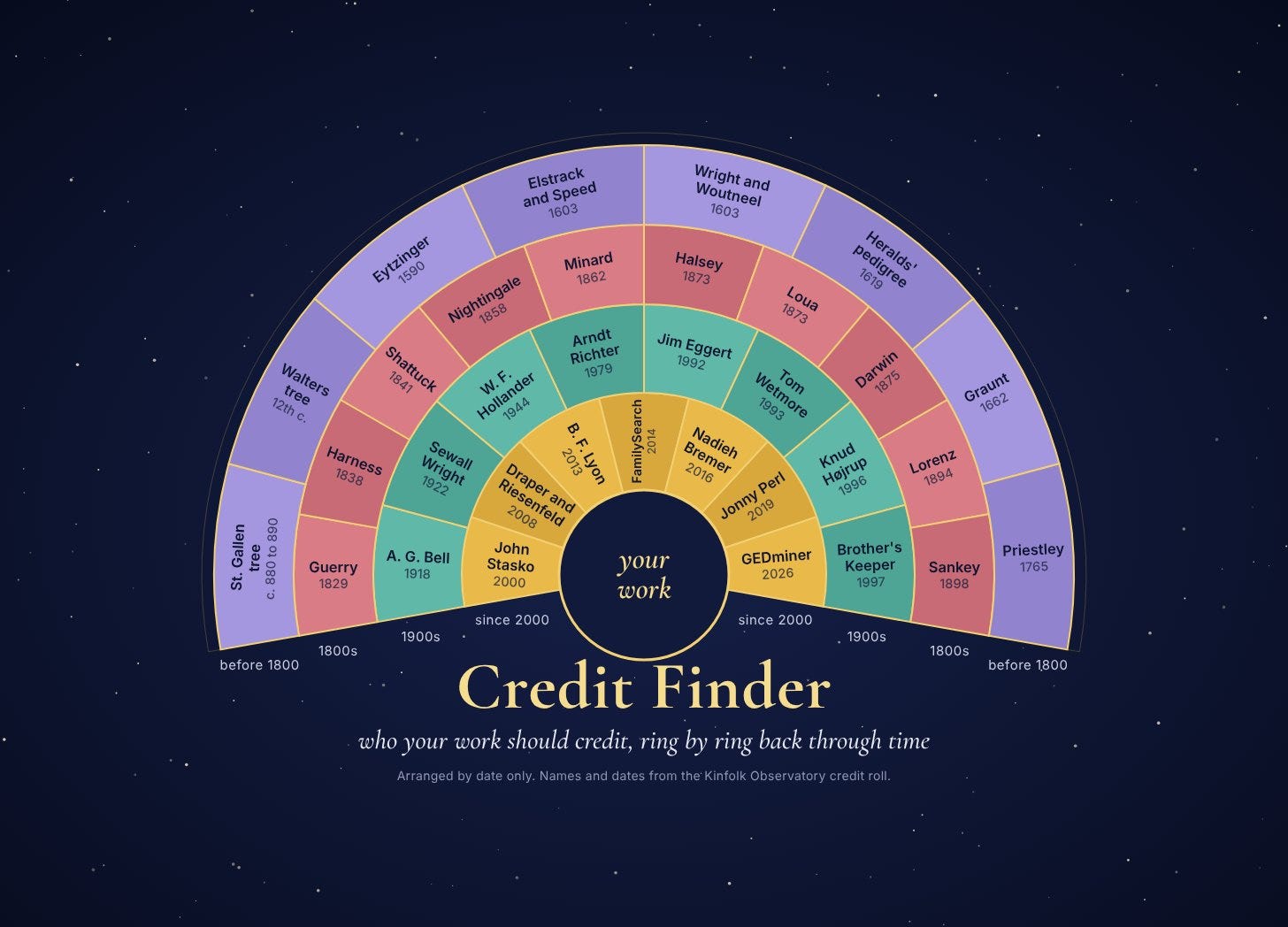
Earlier work we found afterwards. Everyone who did something first or did it well before us, whether or not we ever saw it. Jonny Perl is here. So are Michael Eytzinger, whose 1590 ancestor numbering is the exact rule the Observatory's code uses; Joseph Priestley's 1765 Chart of Biography; Lemuel Shattuck's 1841 circular family chart; Nadieh Bremer's Royal Constellations; Ancestry's LifeStory (our view of the same name is now called Life and Times, so the name stays theirs); Gramps and its contributors; and many more.
What moved me most was how many people the Observatory stands on without ever having known it. Some of them drew these pictures centuries ago: a royal family tree engraved in 1603 already draws lines converging on a shared ancestor. Every one of them deserves to be named, and now they are.
A History of Genealogy Charts
The Finder's findings were too good to leave in a spreadsheet. They became an illustrated article, A History of Genealogy Charts, which walks from medieval rolls and Eytzinger's numbering through Priestley, Shattuck, Minard and Nightingale to the tools many of us use today, with each Observatory picture set beside the work that came before it. It carries the full credit roll.
It now has its own page on the Kinfolk Observatory: observatory.vibegenealogy.ai/history
Introducing Credit Finder
Then I wanted the method to be something anyone could use, not just me, and not just for one genealogy tool. So we turned it into a skill.
Credit Finder is a free Agent Skill for Claude and ChatGPT. You give it a digital work: an essay, a web page, an app, a codebase, an image, a map, a dataset. It looks for who that work should credit, and it gives you back one report with its evidence, its uncertainty, and credit lines you can paste.
It sorts what it finds into five groups:
Direct influence. The work, or its maker's records, says this source shaped it.
Historical predecessor. Someone did a matching thing earlier, with dates to show it.
Technical dependency. Code, data, or a standard the work actually uses.
Independent discoverer. Someone reached the same result separately, with evidence that it was separate.
Ordinary citation. The source of a quotation, a number, an image, or a fact.
A few rules are built into it, and they are the lessons of last week:
It never accuses. Earlier work and similarity do not show copying or intent. The report shows who came first. It never says anyone stole.
It does not guess at AI training. For AI-assisted work it says plainly that no review can establish which training sources shaped a particular output.
It does not say "first." It says "the earliest example we verified," because there is almost always someone earlier.
It reads, it does not interview. It works from the work itself, its records, and public sources.
It has three speeds. Quick checks a handful of points. Standard, the default, does a fuller review. Deep sends a fresh challenger after every finding to try to overturn it, the way the Finder did.
It was written by Claude under my direction, revised by ChatGPT in an outside review, and then the revision was audited and merged back. As a final test, it was run on itself: its own CREDITS.md file is a Credit Finder report on Credit Finder.
The easy way: hand the link to your chatbot
You do not need to know what GitHub is, or what a "skill folder" is, to try this. Let your AI assistant do the reading for you.
Copy this link:
https://github.com/DigitalArchivst/credit-finder
Then open the AI assistant you already use (Claude, ChatGPT, or another) and paste something like this. Here is what I'd type, if you'd like to borrow it:
"Please read this GitHub page: https://github.com/DigitalArchivst/credit-finder. In plain words, tell me what it is, what it does, and what its limits are. Then tell me whether you can install it for me, and what installing it would actually change on my computer or in my account. Don't install anything until I say yes. If you can't install skills, tell me whether you could read its instructions from the page and follow them right here in our chat instead."
What happens next depends on the kind of assistant you are using.
A chat app with web access (the Claude or ChatGPT website or app, for example) should be able to read the page and explain it to you. It usually cannot install things on its own. When you are ready, ask it to walk you through the steps: you will download one ZIP file from the release page and upload it in the app's skills settings.
An assistant that works on your computer (Claude Code, or Codex) can read the page, explain it, and, if you say yes, install it for you. It may ask whether you want it installed for everything you do (often called personal or global) or for one project only. If you are not sure, choose everything you do. You can remove it later by deleting one folder, and the assistant can do that for you too.
An assistant that can't install skills may offer to read Credit Finder's instructions from the page and follow them in the chat. That can work, but it is a lighter version: one assistant working alone, without the helper teams the full skill can use, so it may be slower and less thorough. An assistant that cannot browse the web can't open the page or check sources at all, and its findings will come back marked unverified. I have not tested this route.
Either way, the important words are "Don't install anything until I say yes." A good assistant will explain first and wait.
An honest note: so far Credit Finder has been installed and run in Claude Code only. I expect the other routes to work, but I have not tested them yet. If you try one, tell me how it went.
For experienced users: installing by hand
Credit Finder lives on GitHub at github.com/DigitalArchivst/credit-finder. The skill is the credit-finder folder inside it.
Get the folder. Download credit-finder-v1.3.2.zip from the release page and unzip it. Or, if you use git:
git clone https://github.com/DigitalArchivst/credit-finder.git
cd credit-finder
Claude Code. Copy the folder into your personal skills folder, so it is available in every project:
cp -r credit-finder ~/.claude/skills/credit-finder
On Windows, in PowerShell:
Copy-Item -Recurse credit-finder "$HOME\.claude\skills\credit-finder"
To use it in one project only, copy it to .claude/skills/credit-finder inside that project instead. Start a new session, and it is ready.
Codex. Copy the same folder to ~/.agents/skills/credit-finder, or to .agents/skills/credit-finder inside a repository, and call it with $credit-finder.
The Claude and ChatGPT apps. Download credit-finder-v1.3.2.zip from the v1.3.2 release page and upload it through the app's custom skill import.
How to use it
Once it is installed, start a new conversation and ask in plain words. Paste in your essay, a link to your web page, or the work you want checked, and try one of these:
"Who should I credit for this essay?"
"Do a quick credit check on this repo."
"Deep credit review of this map."
You get back one Markdown report: a short summary, the findings with their evidence and dates, the items it could not settle, and ready-to-paste credit lines. In its first live test, on a short practice essay about maps, it found that "the map is not the territory" should be credited to Alfred Korzybski's Science and Sanity (1933), and it said honestly which sources it had and had not opened.
One caution before you start. Hosted AI tools send what you give them to the company's servers. Do not run it on unpublished work, private family details, or anything too sensitive for the service you use.
The fine print
Credit Finder is experimental and provided as is, without warranty. It is research help, not a legal finding about plagiarism, originality or copyright, so check what it tells you before you rely on it. So far it has been installed and run in Claude Code only. If you try it in Codex or the apps, tell me how it went, or open an issue on GitHub.
The skill is free under the MIT License. The commentary in its credits file is under Creative Commons Attribution 4.0.
Your turn
I owe Leah Larkin and Jonny Perl thanks, and not only for the credit they were due. They asked the question in public, kindly, and it made the Observatory better and more honest.
Everything we make with these models stands on people we will never meet. We cannot always know whose shoulders we are standing on. We can look, and when we find them, we can say their names.
Run it on something you've made. Tell me who you found.
Steve