

A privacy-first how-to. It shows how to turn an anonymized GEDCOM into an animated four-generation pedigree chart and a 300 DPI print with Meta's Muse agent, just by talking to it. Step one is scrubbing the details of living people before you upload anything.
Agents need harnesses. A harness is everything around the model: a workspace, tools, memory, and the ability to check its own work. That's why Muse could pick up a week-old project, and why a Claude Code run could coordinate dozens of helpers that checked one another's work.
The age of the chatbot is drawing to a close. Meta brings real strengths and real concerns, but whatever happens to Muse, personal and professional agents are already here. OpenAI's dots, announced at DevDay, are one more sign, even if adoption lags what the technology can do.
ALSO: Episode 43 of The Family History AI Show podcast is available.
I started this post this morning, September 29, to get ahead of OpenAI’s DevDay. I expected OpenAI to answer Meta’s Muse with a personal agent of its own. This afternoon it did: OpenAI announced “dots,” always-on agents in ChatGPT. Here’s what I’ve learned from robustly testing Muse for professional and personal use:
The age of the chatbot is drawing to a close, and the era of the personal and professional agent is already here.
A pedigree chart that moves
Muse is Meta’s new personal AI agent; you’ll find it at muse.ai, though it isn’t yet available everywhere. Last week I handed Muse an anonymized GEDCOM with about 3,000 individuals. I asked it to identify me, create a four-generation pedigree chart, then flip it and animate it. It did, with maybe two or three tweaks along the way. Muse is no joke.
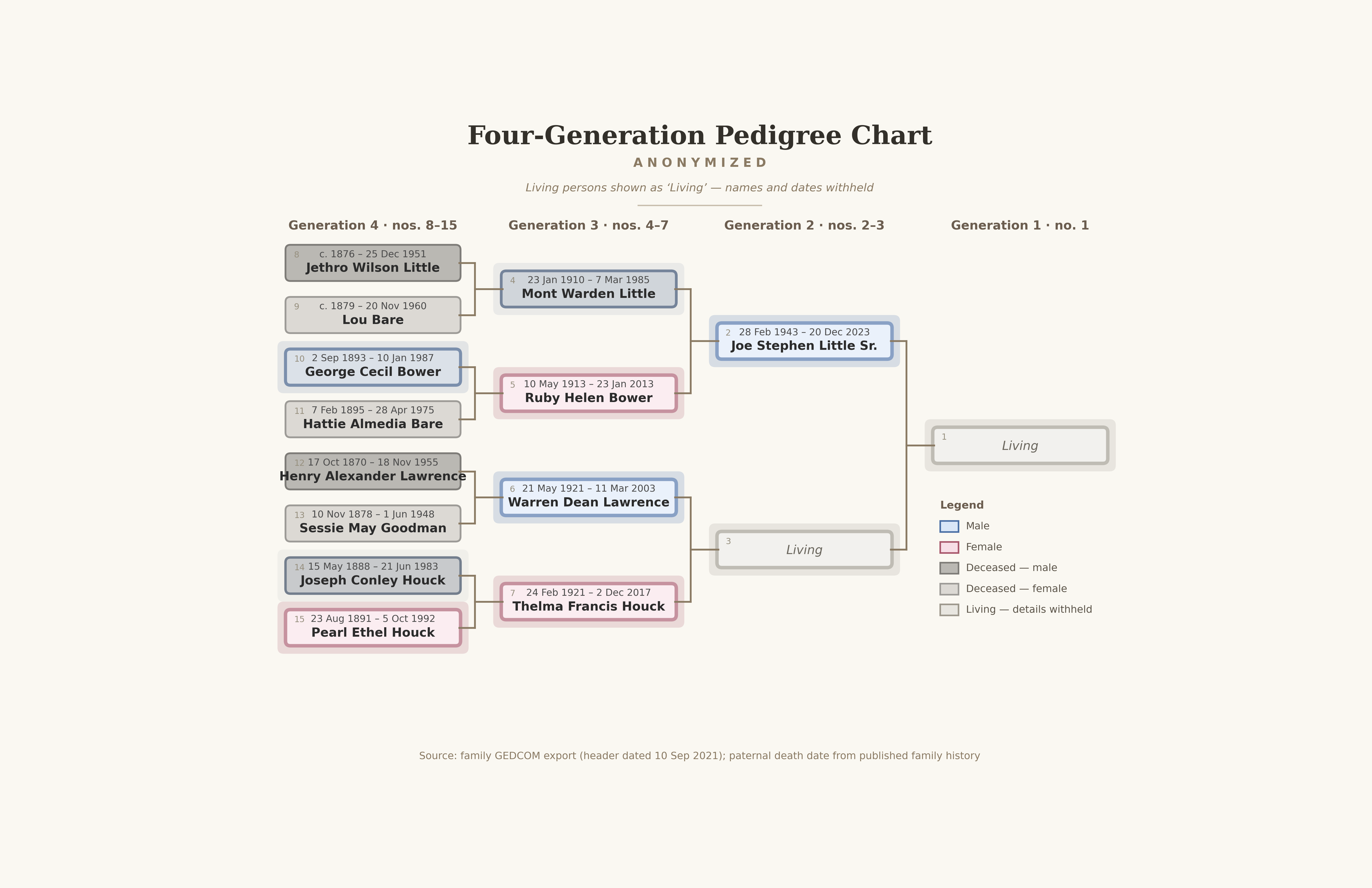
The result is a ten-second silent video. My ancestors start on the left, and the chart travels forward through time to me on the right. Each person fades in, in birth order. Each glows while alive, then dims when their life ends. The two living people on the chart, me included, appear only as “Living,” with no names or dates, and stay lit at the end. I named my Muse agent Jane, and I asked her to introduce herself and post the first version on Facebook on my behalf.
The final version: four generations in ten seconds. Each person appears in birth order, glows while alive, and turns gray at death; the two living people appear only as “Living.” Made with Meta’s Muse from an anonymized GEDCOM.
This morning I went back to the same project and kept refining it just by talking. The deceased now fade from blue or pink into shades of gray. The legend explains the grays. The little “B” and “D” labels, which crowded the Ahnentafel numbers, are gone, replaced by a simple en dash. Then I asked for an 11×17 print at 300 DPI, and Muse drew one fresh from a single frame of the animation.
How to do it yourself
Here’s the recipe, with the privacy step first, where it belongs.
Decide your privacy rule before you upload anything. At a minimum, scrub the details of living people. Before I chose a GEDCOM, I described about a dozen files I had handy and asked Muse which it preferred. It picked the one with all the sources and all the dates of living people. So I asked whether that file would be used as training data under Meta’s Terms of Service. It said, “Yes, of course.” So I said, “Nope, let’s work with the anonymized file.” Taking care to safeguard privacy is a core component of responsible use of AI in genealogy. As the Coalition for Responsible AI in Genealogy says in its privacy guideline, “members of the genealogical community take reasonable measures to safeguard private information when using AI.” In hindsight, I should have been even more explicit about this, and cited the Coalition’s guideline, when I first shared the video.
Start with a still chart. Ask for a standard four-generation pedigree chart from the GEDCOM, with Ahnentafel numbers, a legend, and a source note. Then ask the agent to review it, critique it, suggest improvements, and make them. Repeat until it reads cleanly at a glance.
Flip it. Ask for the generations to run left to right, oldest ancestors on the left and you on the right, so the chart reads like a sentence and like a timeline.
Describe the motion before anything is rendered. In mine, people appear in birth order, glow while alive, and dim at death. The living stay lit; the whole animation lasts about ten seconds. Ask the agent to describe its plan back to you. Then approve the plan before the agent renders the animation. Decide what to leave out, too. We left out a running year counter, so the video never shows a year for the living.
Refine by conversation. Look closely, even zoomed in at 100%, then say what you want changed, one idea at a time.
Export a still and a print. An animation is a series of still frames, so any moment can become a printable chart. I asked for 11×17 at 300 DPI.
Keep every version. Give each revision a new filename, so you never lose track of which one you’re looking at.
Under the hood, Muse wrote a small Python program that drew 300 individual frames, and a standard video tool stitched them into an MP4. You don’t need to know any of that to direct the work. For the curious, Jane wrote a step-by-step explainer the morning we made the first video: From Names on a Page to Lives in Motion (PDF).
What did it cost? When someone asked, I checked my usage: I used about 7% of my free weekly allotment. As best as I can tell, that’s about half of one day’s free allotment.
Agents and harnesses
A “harness” is everything wrapped around the model that lets it do work: a workspace for files, tools it can run, memory of the project, and the ability to check its own output. That’s what made the pedigree chart possible.
When I came back this morning, a week later, Muse still had the animation, the still charts, the script, and the explainer sitting in its workspace, ready to pick up. It reported checking its renders before handing them back. It even made one good suggestion I hadn’t asked for: add the gray swatches to the legend so the final frame explains itself.
Claude Code is another harness. Early this morning, with a weekly usage allowance about to expire, I asked Claude Code to spend the remaining capacity on real work. One AI acted as coordinator. According to the report Claude wrote afterward, which I’ve reprinted as an appendix below, the coordinator started 43 helpers and 11 separate sessions, ran them in parallel on my own files for about an hour, and produced roughly 1,225 files across 33 projects.
It wasn’t flawless: at one point it launched too much at once and burned through a quarter of my five-hour usage window in about four minutes.
The report calls helpers checking helpers “the most important part.” The reviewers caught a recovery plan that was “not safe to run as written,” a draft that credited a database note to me with nothing to show who wrote it, and a number nobody could trace. At the end, 95 decisions were still left for me.
What about Meta?
Technically, Meta AI is now better than most of its peers: still behind OpenAI and Anthropic, but ahead of xAI, Google, Mistral, and other frontier labs. And Meta’s Muse agent harness is currently best in class, both in usefulness and, certainly, ease of use, far ahead of Grok Bot, Hermes, OpenClaw, and similar agent systems.
A few weeks ago, Meta AI surprised many with a very strong set of releases, after being foolishly written off by pundits many months ago.
Those strengths and benefits may nevertheless be overwhelmed by fears and concerns, some real, some imagined, including:
a questionable track record on responsible use and minors’ access;
access to vast amounts of personal user information;
a massive user base;
and the further concentration of wealth and power (Meta isn’t just releasing strong models and agents; it is also building out the data center infrastructure).
Muse could be the first meaningful experience of AI for billions of users. Because it is so well done, powerful, and useful, many will love it without even thinking of it as “evil AI,” a largely Western hobgoblin at which much of the Global South and East may scoff.
For my part, I’m scrubbing the details of living people because I assume Meta is using everything you give them. This time next year, I expect local models will be strong enough to do anything locally, safely, privately, that a genealogist could imagine.
From chatbots to agents
A chatbot answers a question; an agent takes on a project, like the pedigree chart above, and goes to work.
Even if Muse doesn’t become most people’s personal agent of choice, for any of the reasons above, the age of the chatbot is drawing to a close. OpenAI’s dots, announced September 29, are one more sign. Dots connect to thousands of apps, so the privacy rule from step 1 applies to them too. For now they come only with some of OpenAI’s paid plans, while Muse has a free tier.
Like all things AI, though, adoption and diffusion will lag technical capability badly (the Loathsome Jargon for this is “overhang”), so early adopters will gain an advantage that latecomers and abstainers may find difficult, if not impossible, to overcome. On the other hand, though, I suspect adoption will just continue to become easier as “AI” disappears under the surface and machine intelligence is simply built into everything, invisibly. Still, the AI literacy and experience that earlier adopters have banked over the past four years will be a substantial advantage.
It will certainly be interesting to watch the difference between “expressed preference” (what people say they want) and “revealed preference” (what their actual choices of time, money, votes, and attention show they want) over the next couple of years.
Conclusion
The next couple of years are going to be unhinged. Ultimately, I trust and believe in people. As the tangible benefits and costs become known, we’ll find our way through this disruptive time.
Strengthening democratic institutions so that the will of the people continues to drive outcomes is vital.
Appendix: One Morning, Many Helpers
Here’s the field report I mentioned above. Claude (Anthropic’s Opus 5.5 model) wrote it on the morning of September 29, 2026, from the session’s own records. The report speaks of me in the third person.
- Steve
At a glance:
Helpers started: 43 by the coordinator, plus 11 separate sessions.
Time the team ran: 64 minutes, from 7:52 to about 8:56 AM.
Files produced: about 1,225, across 33 projects.
Left for a person: 95 decisions, 12 of them tied to dates.
The short version
Steve had 93 minutes before a large share of his paid AI usage expired. He asked one AI to spend that capacity on real work. That AI acted as a coordinator. It hired dozens of AI helpers, gave each one a job, and ran many of them at the same time on Steve’s own files. Other helpers then checked the first helpers’ work, and they caught real mistakes.
By the deadline the team had produced about 1,225 files across 33 projects. Every project was left with a note saying exactly where to pick it up later. Nothing was sent, published, or installed without Steve’s say-so.
This is not a chatbot
Most people use AI like a smarter search engine. You type a question, read the answer, and close the tab. One question gets one answer, and nothing gets done in the world. This session used Claude Code, which works differently in three ways.
It works on your computer. Within limits you set, it can open and read your files, run programs, search the web, and write new files.
It takes many steps on its own. “Research this and write a report” becomes dozens of actions: find the files, read them, check facts, write, and check again.
It hands work to helpers. One Claude can start other copies of Claude, give each a separate job, and let them work at the same time. A helper can start helpers of its own.
A few terms used below:
Model: the particular AI “brain.” Anthropic offers several, from small and fast to large and most capable.
Token: the unit AI work is measured in, roughly three quarters of a word, counting both reading and writing.
Helper: a copy of the AI given its own job and its own tools. Also called an agent.
Lead: a helper in charge of one whole project, which may hire helpers of its own.
Session: one running conversation with the AI, with its own memory.
Use it or lose it
Steve’s subscription meters his usage two ways:
A 5-hour window: how much he can use in any five hours. When it is full, he waits for it to refill.
A weekly allowance: how much he can use in a week. It resets every Tuesday at 9:00 AM, and whatever is unused expires.
At 7:26 AM that Tuesday, only 26% of the week had been used. About three quarters of what he had paid for was about to vanish. So Steve said: spend it on useful work before 9:00.
One full 5-hour window turned out to be worth only about a fifth of a week.
It took roughly four and a half points of the window to use one point of the week. So even a perfect last-minute sprint could recover only about 20 of the 74 unused points. To use a whole week, the work has to be spread across the week. That became one of the morning’s most useful findings.
Who did what
Before starting anyone, the coordinator wrote a one-page rulebook every helper had to follow: write drafts only and change no existing file; send no email, post nothing, and buy nothing; treat some folders as read-only; copy a database before opening it; never invent a fact; check the clock before stating a time; keep private details out.
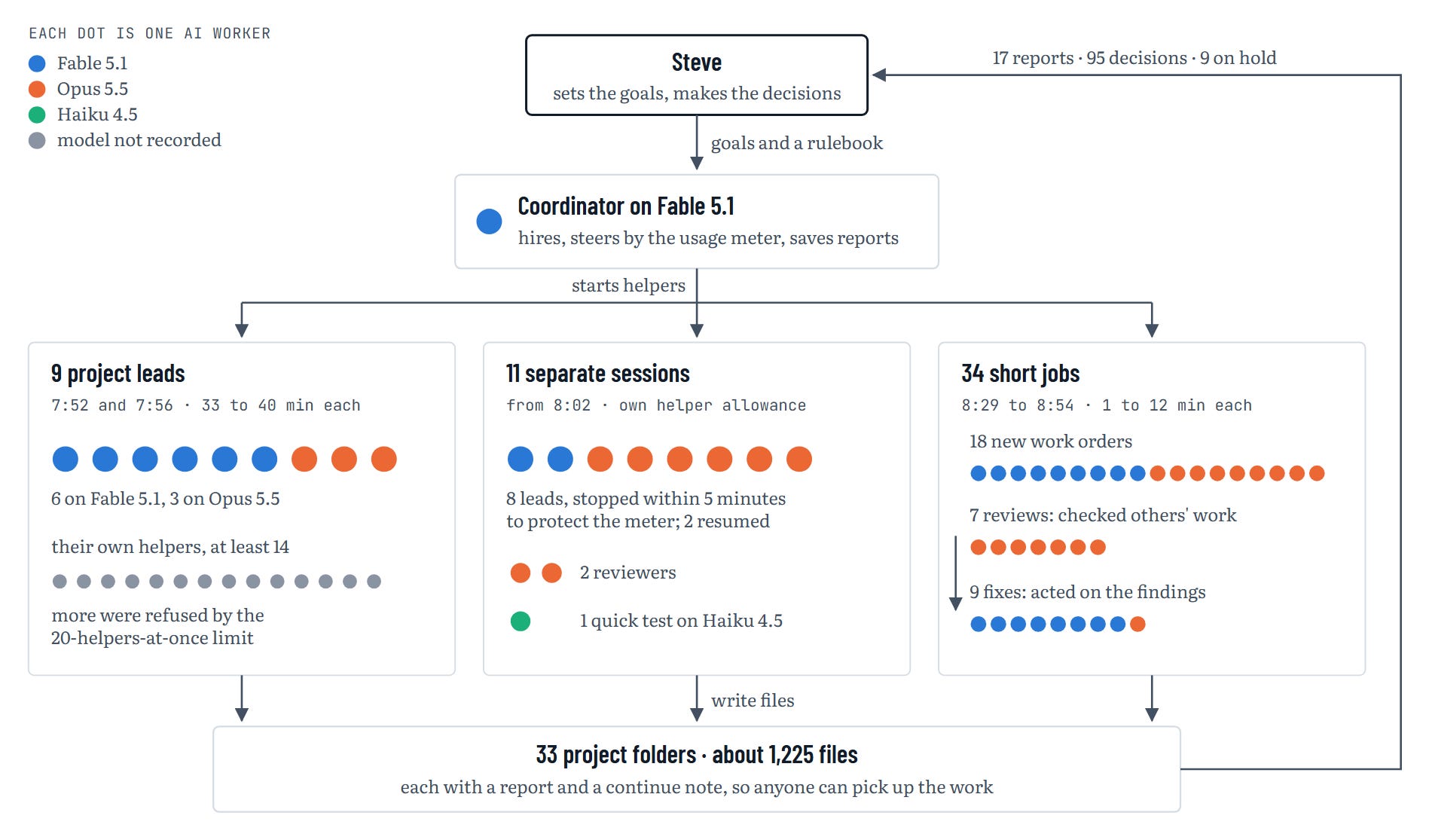
The models, and how each was used:
Fable 5.1, Anthropic’s most capable generally available model (26 workers): the coordinator; leads on the hardest design work (a research pipeline, the network map, the startup routine, two websites, a workstation recovery plan); most fix-up jobs after review.
Opus 5.5, a very capable model one tier below Fable (28 workers): research, fact-checking, and pulling many documents into one; all nine independent reviews; leads on the personal website, the idea mining, and one planning project.
Haiku 4.5, Anthropic’s smallest and fastest current model (1 worker): one quick test that a new separate session could read, write, and start helpers.
The rule of thumb: the most capable model where judgment and design mattered most, a strong model for research and checking, and the cheapest model for a simple test. The counts cover the coordinator, its 43 helpers, and the 11 separate sessions.
Watching the fuel gauge
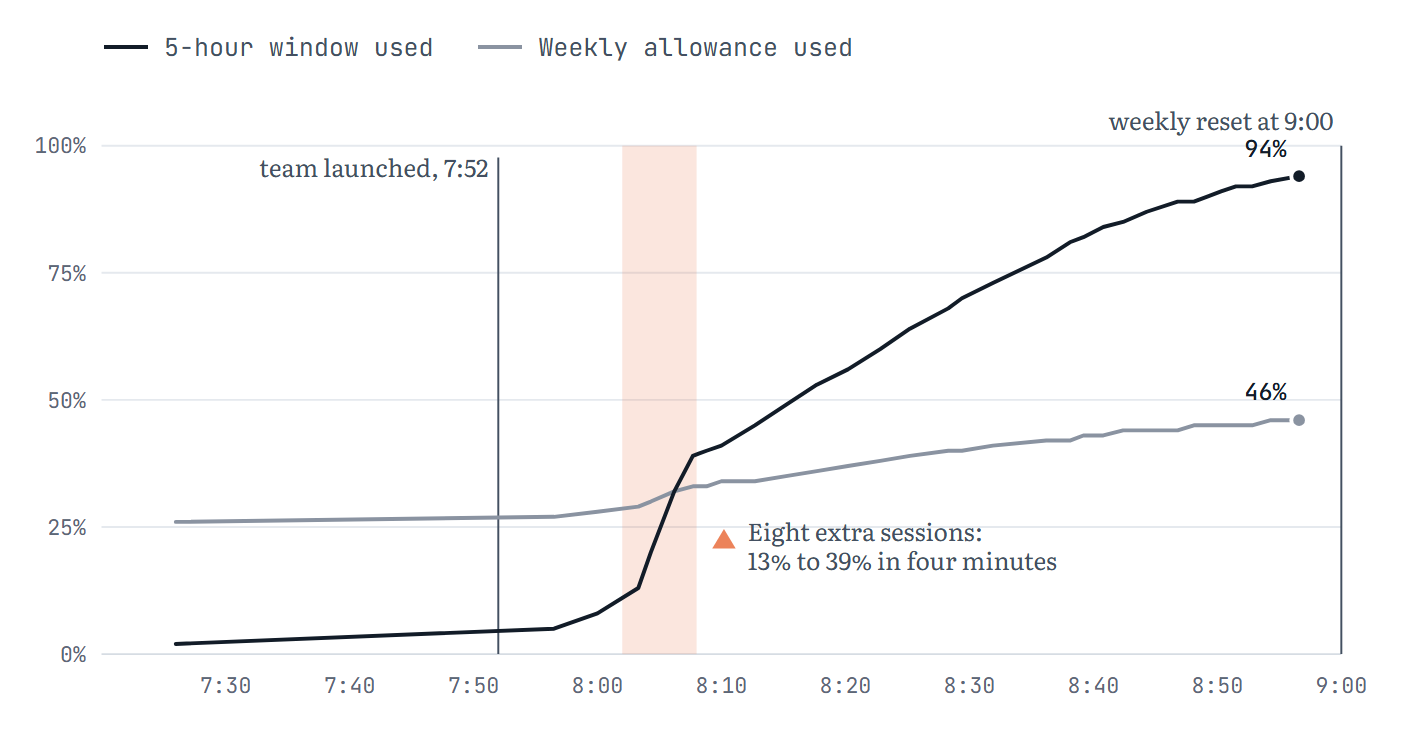
The coordinator read the usage meter every two or three minutes and steered the team toward about 95% of the 5-hour window at the deadline. The overshoot at 8:02 is visible: eight extra sessions pushed the meter from 13% to 39% in about four minutes, and the coordinator stopped them.
How the morning unfolded
7:23, getting ready. The coordinator session opened. It checked the clock against an internet time service (two seconds off), confirmed which computer it was on, read Steve’s project records, and read the usage meters. Steve named four areas of interest and four topics that had to get their own leads.
7:52, seven leads launched at once. They took a family-history research pipeline, a map of the home computers, the assistants’ startup routine, three websites (one lead each), and the mining of an earlier session for ideas. Each was told to hire four to eight helpers of its own.
7:56, two more leads. One wrote a recovery plan for a home workstation. The other planned a new operating system for another laptop.
7:59, the ceiling. One session can run only 20 helpers at once, counting helpers’ helpers. Eight more launches were refused.
8:02, a workaround, and an overshoot. The coordinator started eight separate sessions, each with its own allowance of helpers. They worked too well: at that pace the window would have run dry around 8:16, before any lead could finish. All eight were stopped by 8:08.
8:10 to 8:25, steering by the meter. The coordinator restarted two stopped sessions with tighter limits, stopped one of them again, and added two reviewers.
8:26, a new instruction. Steve asked for a wind-down that can be continued later in the week. Every helper wrote a continue note: what is done, what is not, what to do next, and what a newcomer must know.
8:28 to 8:35, the nine leads reported back after about 33 to 40 minutes of work each.
8:29 to 8:54, 34 short jobs. Each was one helper working alone for one to twelve minutes. Eighteen did new work, seven reviewed or traced other helpers’ work, and nine fixed what the reviews found.
8:56, everything landed, with the 5-hour window at 94%.
What came out of it
All of it is draft work, waiting for Steve’s review.
Genealogy:
Read-only tools that pull data out of a family-tree database
A design for an automated research pipeline
Research leads on one 19th-century ancestor
Plans for two upcoming class sessions, a seminar handout, and podcast news items
Systems:
A machine-readable map of the home computers, with a program that draws it
Recovery plans for a workstation and planning for a laptop
Improved startup routines for the AI assistants
A design for running AI work unattended overnight
Websites and everything else:
Three working website prototypes and a memo reconciling their platforms
A meeting briefing, a conference logistics check, a correspondence list, and an essay source check
One combined list of 95 decisions for Steve, dated items first
The most important part: helpers checking helpers
A single AI working fast will make confident mistakes. So the coordinator assigned other helpers to find them, with instructions to open the sources and verify every claim. They found real problems.
A dangerous plan. A computer-recovery plan was “not safe to run as written.” Among other things, its undo step was never tested before the risky change it was meant to undo.
An unsupported claim. A genealogy draft called a note in the family-tree database “Steve’s own words.” Nothing records who wrote it, and it may have come from someone else’s online tree. It was corrected.
A number nobody could trace. A meeting briefing said a tool worked in “22 of 24 runs,” but that figure was not in the file it cited. It was dropped.
Quietly weakened safety rules. Drafts of the new startup routine had dropped two safeguards the originals had. They were restored.
A launcher that could write anywhere. The overnight design could let an unattended run write anywhere on the computer. It is on hold.
A disputed count. Was it 13,907 or 13,910 duplicate citations? A third helper found both were right. The difference is whether capital letters count as different.
A second AI whose only job is to find mistakes catches a lot of them. The final decision still belongs to a person: nine items are on a “do not run yet” list until Steve approves them.
What went wrong
It launched too much at once. The eight extra sessions used about a quarter of the 5-hour window in four minutes, a pace that would have emptied it before any lead finished.
It restarted the wrong session for about 24 seconds. That helper wrote nothing.
It gave a vague schedule. Told when to close, most leads quit about five minutes early. The fix is to say “keep working until” as well as “stop at.”
It stated two times without checking the clock, which breaks one of Steve’s standing rules. Both were corrected.
One of its scripts garbled some file paths in three records. A final scan found the damage, and it was repaired.
Helpers could not save their own final reports, because the software blocks helpers from writing files with that name. The coordinator saved 17 reports by hand.
By the numbers
Sessions: 12, one coordinator plus 11 separate sessions.
Helpers the coordinator started: 43 (9 leads and 34 short jobs; 23 on Fable 5.1, 20 on Opus 5.5).
Helpers the leads started: at least 14 that the leads reported.
Most at once in one session: 20, the software’s limit.
Work by the nine leads: about 3.2 million tokens, each lead using 317,000 to 387,000.
Work by each short job: about 90,000 to 240,000 tokens.
5-hour window used: 2% at 7:26 AM, 94% at 8:56 AM.
Weekly allowance used: 26% to 46%.
Files produced: about 1,225, across 33 project folders.
Records left behind: 17 reports, 33 continue notes, and 7 folders with an independent review or trace.
Decisions for Steve: 95, of which 12 are tied to dates, plus 9 “do not run yet” holds.
Why this matters for a casual user
You can delegate, not just ask. The unit of work becomes a project, such as “prepare everything for next week’s class,” rather than a question.
Parallel help is real, and it has a meter. You can run many helpers at once, but you have to watch what it costs, as you would with any team.
Checking is where the value multiplies. Asking a second AI to find what is wrong is often worth more than asking the first AI to try harder.
Written notes make the work last. Every project here can be resumed by a fresh AI, or a person, from its folder alone.
The person stays in charge. The AI did the preparation, research, and drafting. The 95 decisions are still Steve’s.
A first safe exercise
This takes about 20 minutes and uses the team’s three habits: plan first, have a second helper check the work, and leave a note for next time. You need an AI tool that can work with files on your computer, such as Claude Code, which runs in the Claude desktop app, on the web, and in a terminal.
Before you start:
Work on copies. Make a folder called practice and copy, don’t move, three to five documents into it. Choose things you know well and would not mind anyone reading: a few recipes, a club newsletter, your notes from a public talk.
Leave out anything private. Whatever the AI reads is sent to the AI service to be processed. Keep out passwords, medical and financial records, and other people’s private messages.
Keep the approvals on. By default Claude Code asks before it changes a file or runs a command. Leave that setting alone while you learn, and read each request before you approve it.
The steps:
Point it at the folder. Open the tool in your practice folder and nowhere else.
Ask for a plan first. Type: “Read the files in this folder. Before you write anything, tell me in five steps how you would summarize them.” Correct anything you don’t like.
Ask for the work. Type: “Write a one-page summary of these files into a new file named summary.md. Don’t change or delete any existing file.”
Ask a fresh helper to check it. Start a new session, so the checker hasn’t seen the writer’s reasoning, and type: “Read summary.md and the other files in this folder. List every statement in summary.md that the files don’t support, and name the file each correct fact comes from.”
Ask for a note for next time. Type: “Write continue.md: what is done, what is not, and what to do next.”
Decide. Read the check yourself. Fix what is wrong and keep what is right. The decision is yours, not the tool’s.
What you will have learned:
An agent can read and write files, not just answer questions.
Asking for a plan first catches misunderstandings before any work is done.
A second helper that only looks for mistakes finds things the first one missed.
A short written note lets you, or a fresh AI, pick the work up later.
Once that feels comfortable, try the check with two separate checkers, or ask the tool to start a helper for you. That is the first step toward the kind of team described here.
How this post was made
The argument is mine, and I chose the sources, outline, and title. The thesis, the case for Muse, the worries about Meta, the points about overhang and preference, and most of the conclusion come from an essay I wrote on September 29 and posted on Facebook. The privacy story, the cost, the forecast about local models, and my DevDay expectation come from my replies and notes.
Before posting the essay, I ran it through my Quick Editor prompt; an AI suggested copy edits, and I chose which to accept. Anthropic’s Claude read my sources and drafted the rest on my outline. It wrote the opening news update, the how-to steps in the order Jane’s explainer used, the section on agents and harnesses, most of the captions, and the transitions, and I let it judge which passages sound like me. Other Claude instances checked several drafts, including this one, for accuracy and my voice. OpenAI’s Codex did one editing pass, and Grok Bot researched the DevDay news and suggested the points about dots. My Muse agent, Jane, built the chart, the animation, and the print from my directions over two sessions a week apart. I read and approved every word. Phrases and facts carry over directly from Jane’s Facebook caption and her explainer, and from Claude’s report. Claude Opus 5.5 wrote the Appendix based on our morning work.